The employee card
Store, primary and secondary roles with a level from 1 to 5, contract hours, 5-day or 6-day week, permanent or fixed-term with periods per season, shift preference, whether they can close the store, and payroll’s code.
For businesses with shift work across several stores
Postorunner builds each store’s week in about 20 seconds — with 11-hour rest, day limits and contracts checked, staff borrowed between stores, and the two payroll files your accountant expects, ΠΡΟΓΡΑΜΜΑ and ΩΡΟΜΕΤΡΗΣΗ, ready in one click.
Nothing to install. To get started, one spreadsheet of your staff is enough.
Tap a shift to see who else could work it.
Want to see your own week? Send us a spreadsheet of your staff and we’ll show you Postorunner with your own stores.
Book a demoIllustration, sped up: real generation takes about 20″ per store. The app itself is in Greek.
Every rule holds
Who else could?
Tap a name to make the change. It’s checked straight away.
How it works
How many people you need per role and hour, once. It’s saved as a standard week («Τυποποιημένο Πρόγραμμα») and copied into each new week with one click.
Day off, leave, sick day, a mandatory day or an availability window — one click on a cell. Recording leave fills in the right days off by itself, 5 + 2 or 6 + 1.
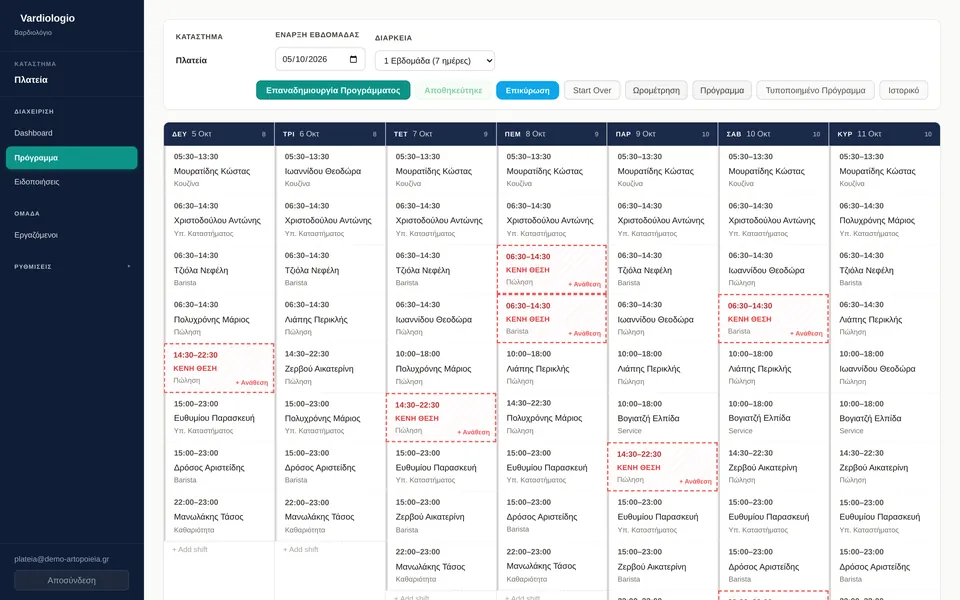
The week comes out in about 20 seconds, for one store or for all of them at once. Anything that couldn’t be covered shows clearly as an empty slot («ΚΕΝΗ ΘΕΣΗ»).
After validation, every change is marked «ΑΛΛΑΓΗ» (changed). ΠΡΟΓΡΑΜΜΑ and ΩΡΟΜΕΤΡΗΣΗ come out in one click, ready for payroll.
Rules
Neither when the week is generated, nor when you save changes by hand.
Drag Tuesday’s start time.
Rest: 7,5 hours Allowed Not allowed: under 11 hours
Optimisation
The week is built by a mathematical optimiser, not by AI — so results are consistent and fast.
AI only steps in when a goal couldn’t be met, and its suggestion is kept only if it’s better.
Any goal that can’t be met is reported.
Several stores
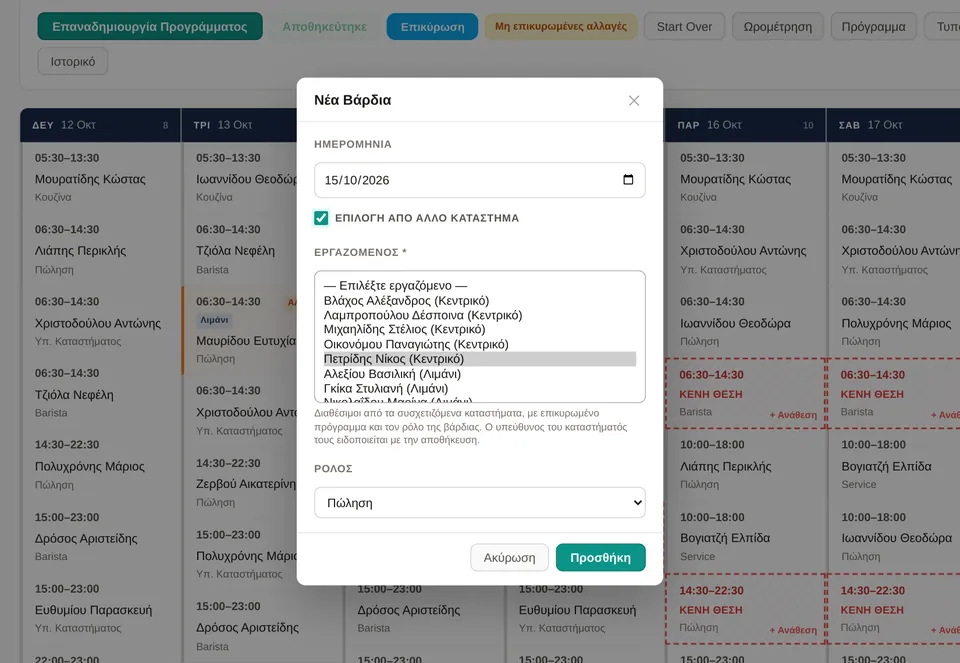
When nobody at a store can take a shift, “Pick from another store” lists the people available in the group’s other stores — and only those who can legally work it. No approval step: on save, their home store is told in its notifications, and the day shows as «ΔΑΝΕΙΣΜΟΣ» (on loan).
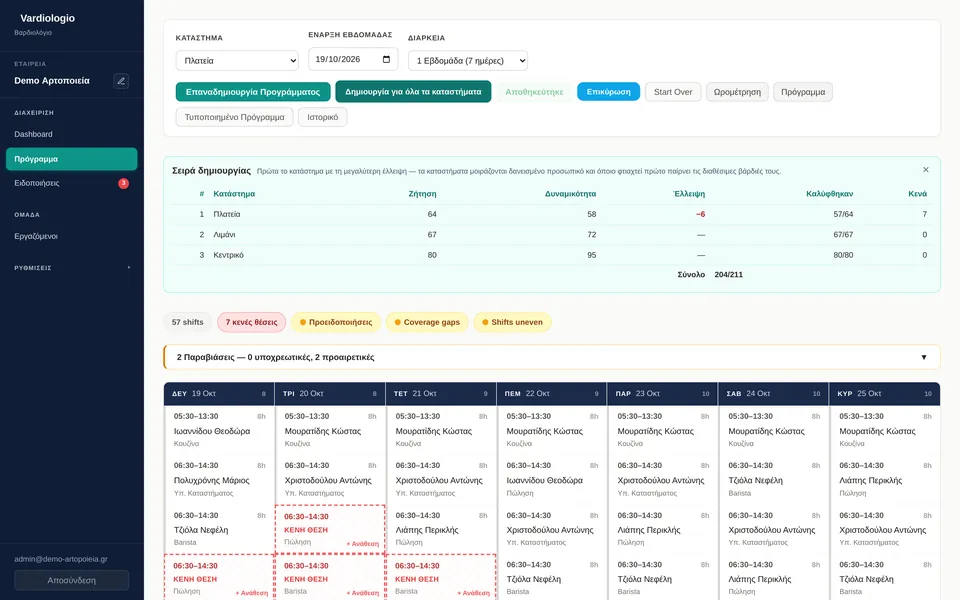
The Admin generates every store at once. It starts with the store that is shortest of staff, so anyone spare goes first to where they’re needed.
The Admin sees every store and groups those that may lend staff to each other. Each manager sees only their own store.
| # | Store | Demand | Capacity | Short |
|---|---|---|---|---|
| 1 | Plateia | 64 | 58 | −6 |
| 2 | Limani | 67 | 72 | — |
| 3 | Kentriko | 80 | 95 | — |
Validation
When the schedule is ready, you validate it. From then on, every change is marked on the board and written in red in the files, compared with the last validated version. Every validated week is kept in the history («Ιστορικό»).
A rule never blocks a swap. If it breaks one — say, the 11-hour rest — a warning appears so you can see it and decide.
Payroll
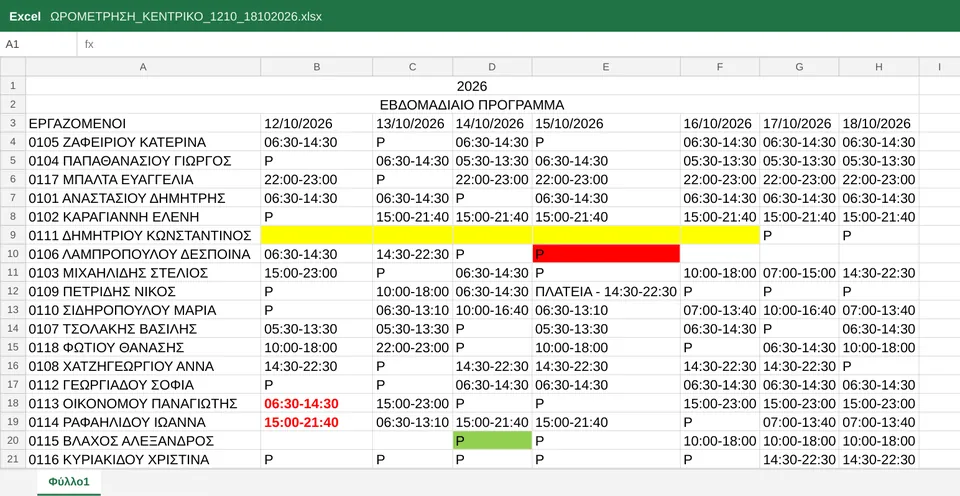
Both payroll files come out one click from the schedule. ΩΡΟΜΕΤΡΗΣΗ, the timesheet, has one person per row with their code in the first column, and for each day a shift code or Ρ for a day off. ΠΡΟΓΡΑΜΜΑ holds the store’s whole year, one tab per month.
| ΕΒΔΟΜΑΔΙΑΙΟ ΠΡΟΓΡΑΜΜΑ | |||||||
|---|---|---|---|---|---|---|---|
| ΕΡΓΑΖΟΜΕΝΟΙ | ΔΕΥ | ΤΡΙ | ΤΕΤ | ΠΕΜ | ΠΑΡ | ΣΑΒ | ΚΥΡ |
| 0201 ΝΙΚΟΛΑΟΥ ΒΑΣΙΛΗΣ | 16:00-23:00 | 16:00-23:00 | Ρ | ΠΛΑΤΕΙΑ - 16:00-23:00 | 16:00-23:00 | Ρ | 16:00-23:00 |
| 0202 ΠΑΠΑΔΟΠΟΥΛΟΥ ΕΙΡΗΝΗ | 06:30-14:30 | 06:30-14:30 | 06:30-14:30 | Ρ | 06:30-14:30 | 06:30-14:30 | Ρ |
| 0203 ΓΕΩΡΓΙΟΥ ΑΝΤΩΝΗΣ | 07:00-13:40 | 07:00-13:40 | 07:00-13:40 | 07:00-13:40 | 07:00-13:40 | 07:00-13:40 | Ρ |
| 0204 ΣΤΑΥΡΟΥ ΜΑΡΙΑ | ΑΔΕΙΑ | ΑΔΕΙΑ | ΑΔΕΙΑ | ΑΔΕΙΑ | ΑΔΕΙΑ | Ρ | Ρ |
| 0205 ΚΩΝΣΤΑΝΤΙΝΟΥ ΕΛΕΝΗ | 10:00-18:00 | 10:00-18:00 | Ρ | 10:00-18:00 | 10:00-18:00 | ||
| 0206 ΑΛΕΞΙΟΥ ΔΗΜΗΤΡΗΣ | 14:30-22:30 | 14:30-22:30 | 14:30-22:30 | Ρ | 14:30-22:30 | 14:30-22:30 | Ρ |
Hover over each mark
Features
Store, primary and secondary roles with a level from 1 to 5, contract hours, 5-day or 6-day week, permanent or fixed-term with periods per season, shift preference, whether they can close the store, and payroll’s code.
Day off, leave, sick day, a mandatory day, availability within set hours, or “would rather not”. Weeks that repeat are saved as standard constraints.
A summary of the day, a readiness score out of 10, up to three suggested actions, and alerts for empty slots. Empty slots are counted from the data, not by the AI.
Every validated week is kept, and you can see all of one person’s shifts.
Contract dates are respected. The Admin moves a person to another store with a date and a reason; shifts already worked stay where they were worked.
New login, change of store, deactivate and new password, from the «Χρήστες» (users) page.
Coming next
Ready on demo When you save the week, each employee gets an SMS with a personal link. It opens on their phone with no app and no password, shows their shifts, and from there they tap “I confirm” or “I have a problem”. The link only works for that person and that week.
Switched on per business once a start is agreed; it needs your staff’s mobile numbers.
An employee reports a problem from their link; the manager sees suggested replacements and covers it in one click. Only that shift changes.
In a stress test, a 100-person store’s week came out in about a minute, with 441 of 445 slots covered — as many as the staff allowed.
They’ll only be scheduled if they solve a real problem for the businesses that use Postorunner.
Data protection
ΑΦΜ, the tax ID, is stored encrypted, never as plain text.
Accounts are kept apart inside the database itself, not just on screen.
Every access to personal data is logged.
A backup every night, and another right before every release.
The app today
Screens from the demo environment, with made-up stores and names. The app’s interface is in Greek.
Getting started
Most delays on a project like this aren’t technical; they’re missing information. Here’s what we need from you:
FAQ
Businesses with shift work across several stores — bakeries, cafés, food service and retail — where shifts run from early morning to late evening and staff move between stores. It works just as well for a single store.
The app is in Greek: it is built around Greek payroll files and labour rules, down to 6ω40λ on the timesheet. This page is in English for owners, partners and managers who prefer it.
No. Postorunner runs in the browser, on a computer, tablet or phone. The Admin and every store manager sign in with their own login.
No. The week is built by a mathematical optimiser with the rules checked. AI only takes a second look when a goal couldn’t be met, and its suggestion is kept only if it’s better. Empty slots are always counted by the system, from the data.
The rules are checked when you save, not only when a week is generated, so a manual change can’t break the 11-hour rest. The one exception is a shift swap: it is never blocked, but if it breaks a rule a warning appears so you can decide.
That’s what ΠΡΟΓΡΑΜΜΑ and ΩΡΟΜΕΤΡΗΣΗ are for: the employee code in the first column, shift codes, Ρ for a day off, 6ω40λ for a 6-day week and 8ωρο for a 5-day week. With each business’s payroll office we are also looking at a direct link to the payroll software or to ΕΡΓΑΝΗ.
Coming next: on every save, each employee will get an SMS with a personal link — no app, no password — to see their shifts and confirm them or report a problem. It is ready on the demo environment and is switched on per business once a start is agreed.
Mostly it depends on the data: your stores, a spreadsheet of your staff, and how many people you need per role and hour. Once those are in, the first week comes out in seconds.
Tell us a little about your business — how many stores, how many employees — and we’ll send you a proposal.
Contact
Tell us a little about your business and we’ll arrange a short demo of Postorunner.
Prefer email? Write to us at info@utilize.gr
Or call us on +30 2310 436 595, Monday–Friday, 09:00–18:00 Greek time (in Greek)
Already have an account? Sign in to the app
We’ll be in touch soon, at the email you gave us.